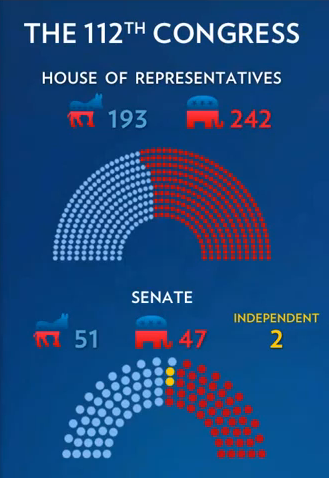
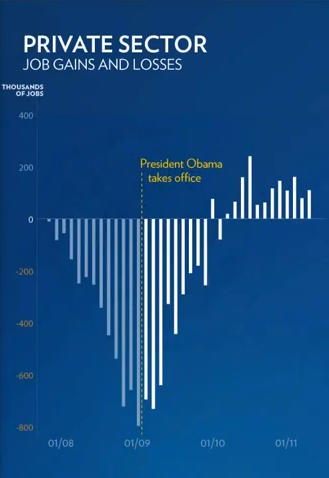
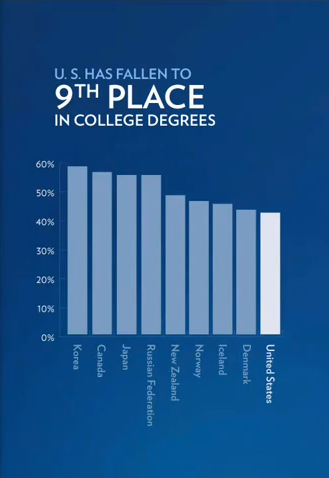
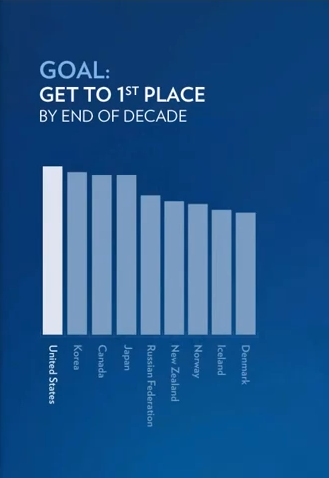
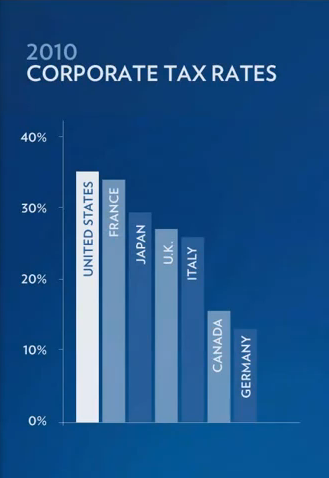
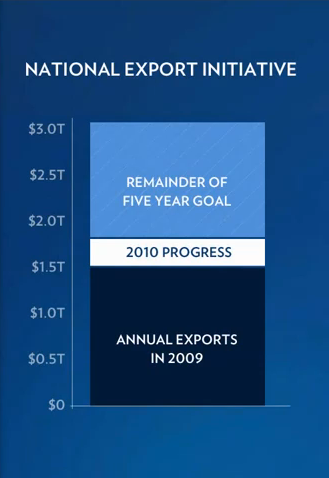
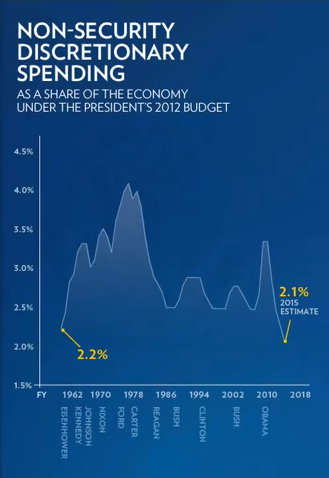
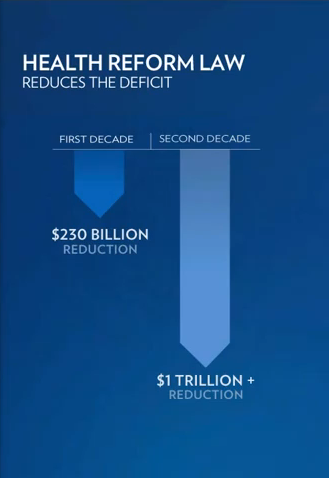
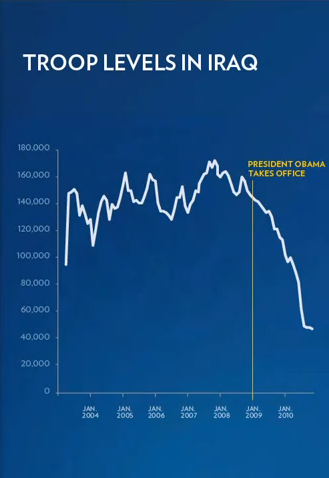
 The enhanced version of last night’s State of the Union speech demonstrated the value of quality data visualizations. Chock full of charts, graphs and infographics, the visualizations reinforced the President’s message with a clarity and lack of chart junk rarely seen in presentations.
Whether you agree with the President’s assertions or not, or disagree with the biases presented in the charts (as all charts have biases), there’s no denying the beauty of the visualizations. As CEO of a data visualization company, it made me happy to see good visualizations being used in the public discourse.
Below I’ve collected the charts, graphs and select infographics from the speech last night. I excluded the infographics I felt lacked any data visualization components. Click on the image to see a bigger version. A link below each image will take you to the part of the speech displaying the visualization or you can tweet a link to the image.
If you didn’t get to see the enhanced version with the sidebar displaying additional information, you can watch the full version on YouTube.
Update: People have pointed out some of the visualizations have design flaws. See the end of this post for corrected images and discussions of these flaws. I’ll try to update this section as people add comments.
What do you think of these visualizations? Post your comments in the comment box below the images.
 Watch In Speech
 Tweet This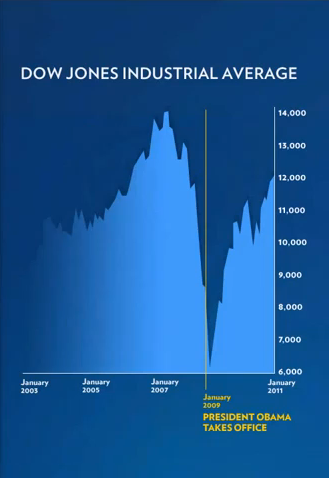



Corrected Charts
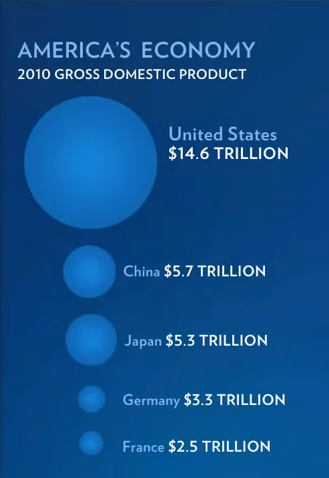
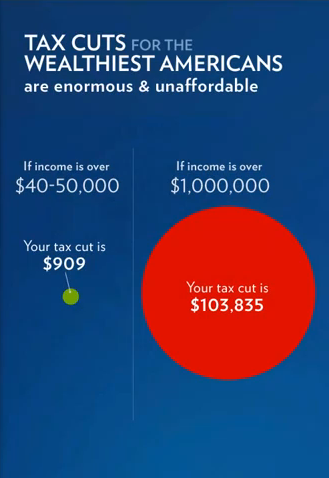
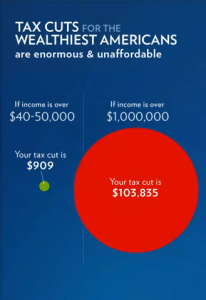
As pointed out by others, the circles used in the 2010 Gross Domestic Product and Tax Cuts for the Weathiest Americans charts may deceive viewers because the differences in areas don’t correspond to the differences in the numbers presented. Below are corrected versions of these charts with descriptions of the specific flaws.
2010 Gross Domestic Product
In the 2010 Gross Domestic Product chart, the radius of each circle has been scaled based on the size of each nation’s economy. This distorts the perception of the relative sizes of the circles since the radius scales linearly, but the area scales quadratically. Basically, the size of the United States economy appears much bigger than it should.
The correct approach scales the area relative to the size of each economy, not the radius. This presents a more accurate view of the data based on the way we perceive circles. Below you can see the original chart (left) along with a corrected chart (right) which sizes each country based on the area rather than the radius.
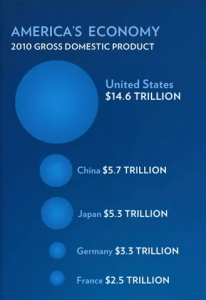
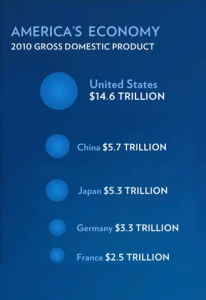
For a detailed discussion on this chart, check out Obama Botches SOTU Infographic, Stock Market Reels. For details on the issue of using area vs radius to size circles, see Linear vs. Quadratic Change and A Simple Visual Perception Experiment.
Tax Cuts for the Weathiest Americans
The Tax Cuts for the Weathiest Americans chart suffers from the opposite problem. The circle is too small–the area of the circle representing tax cuts for people making over $1 million should be bigger. Below the original chart is on the left with the corrected chart on the right.

Did you think the President did a good job with these visualizations? Do you see any other problems with the visualizations? Post your comments below.

13 pings
How to Lie with Numbers – SOTU Edition | I <3 Econ! says:
January 28, 2014 at 9:56 pm (UTC -4)
[…] Great website here, haven’t had a chance to look at it all yet (I try not to watch these things). Feel free to email me thoughts/comments on any graphs you find of special interest. A nice breakout of a bunch of the graphs can be found here. […]
Data visualization: basic principles – Making Data Interactive says:
February 1, 2017 at 4:29 pm (UTC -4)
[…] Fast Fedora […]
Data Visualization: Principles – Making Data Interactive says:
February 5, 2017 at 11:51 am (UTC -4)
[…] Fast Fedora […]
Data visualization: Principles – Making Data Interactive Course Site | Emily Carr University of Art + Design says:
January 7, 2020 at 2:57 am (UTC -4)
[…] Fast Fedora […]